Add TopTechs as a preferred source
The best printer for home use for most Indian families is the Canon PIXMA G3000 at around ₹11,999. This colour ink tank prints, scans and copies, and it connects by Wi-Fi, USB or Canon's phone app.
Canon rates each ₹555 black bottle at 6,000 pages, so a black page costs about ₹0.09 in ink and a colour page about ₹0.34.
Its box holds two spare black bottles as well, and 13,131 buyers on Amazon.in rate it 4.1. A cartridge printer costs less to buy, but its ink costs about 20 times as much per page. If you print only black text, a laser suits you better.
We worked out the ink cost of every page from Amazon.in refill prices and each maker's page yield. Then we added up two years of printing at 50 and 200 pages a month.
Quick answer
- Best overallCanon PIXMA G3000, ink tank with Wi-Fi, print, scan and copy, ₹0.09 a black page and ₹0.34 colour, around ₹11,999
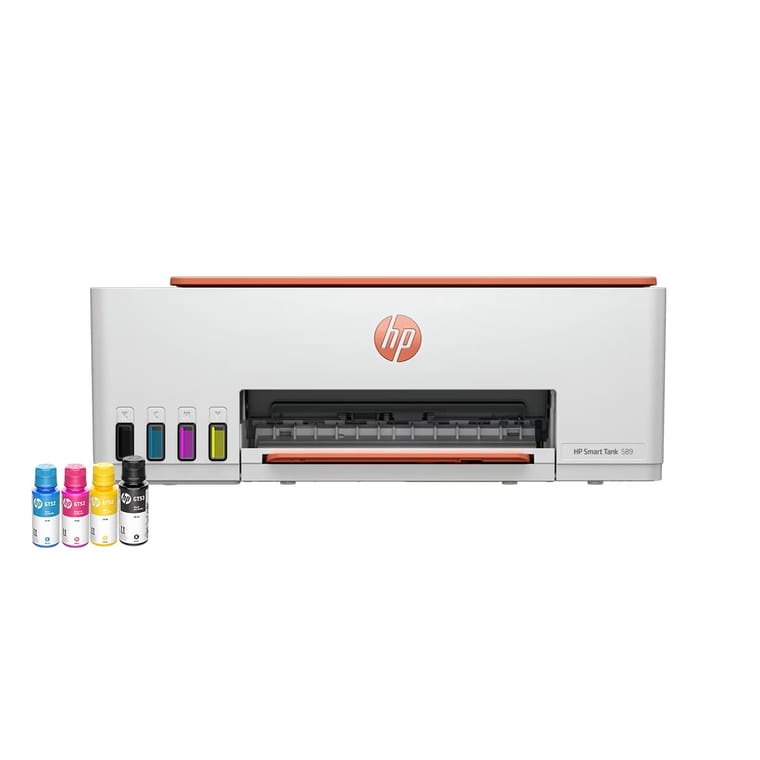
- Fewest refillsHP Smart Tank 589, ink tank with Wi-Fi, print, scan and copy, 10,100-page colour bottles, ₹0.33 a colour page, around ₹11,999
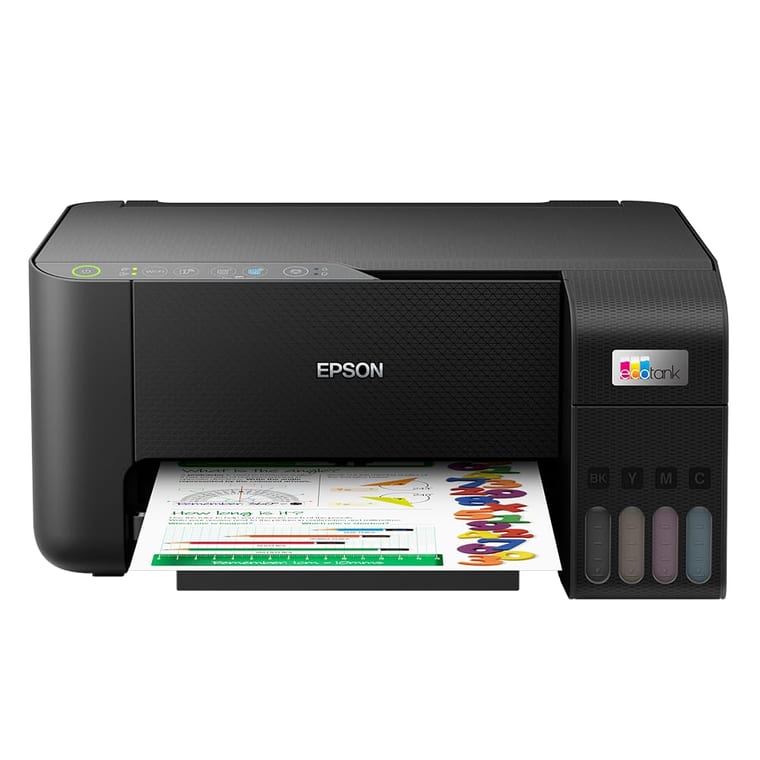
- Best without a Wi-Fi routerEpson EcoTank L3250, ink tank with Wi-Fi Direct, print, scan and copy, ₹0.10 a black page and ₹0.34 colour, around ₹14,419
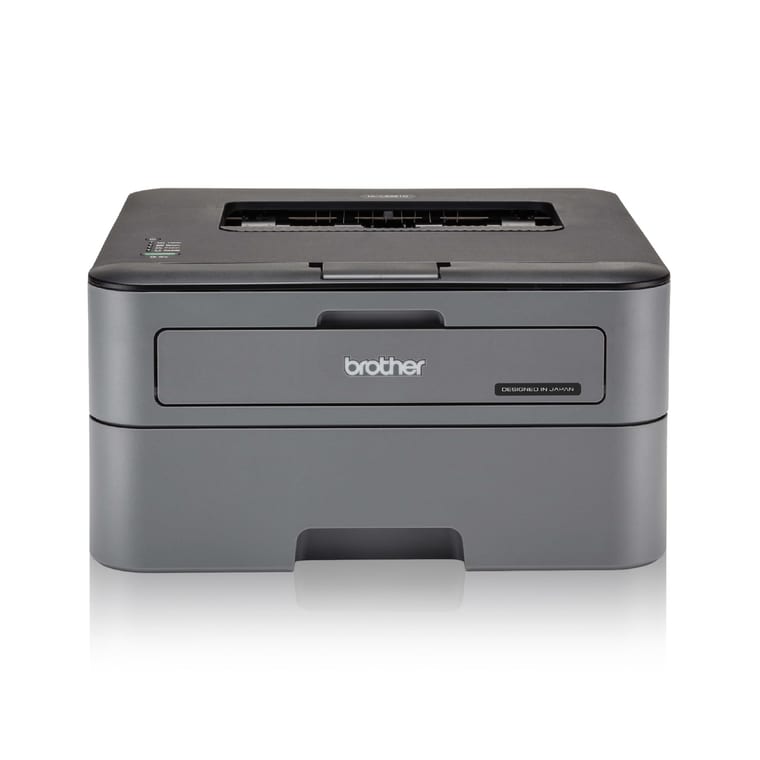
- Best laser printerBrother HL-L2321D, black-only laser, print only, USB, ₹1.37 a page, around ₹10,999
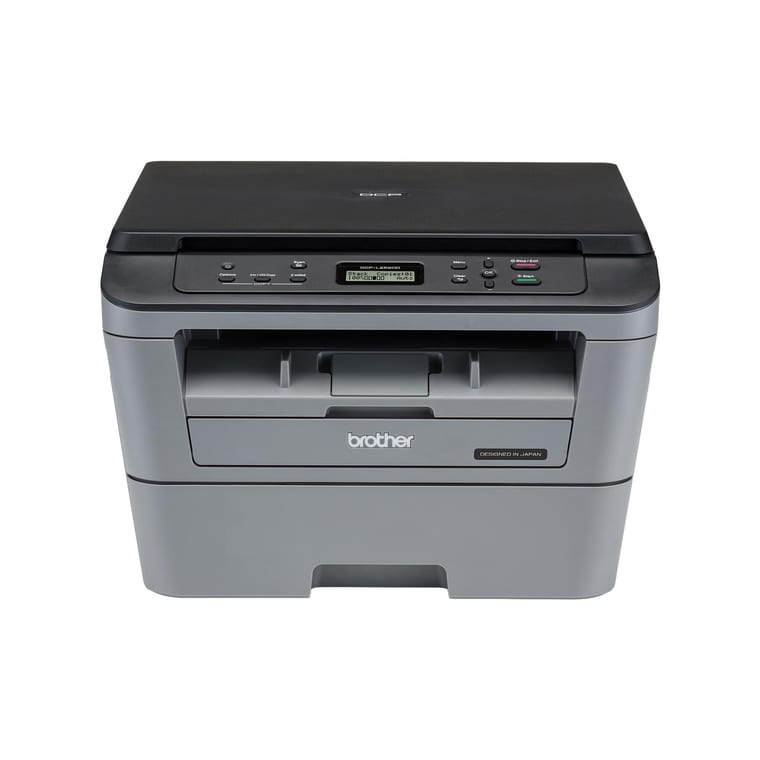
- Best laser all-in-oneBrother DCP-L2520D, black-only laser, print, scan and copy, USB, ₹1.37 a page, around ₹15,599
- Best budgetCanon PIXMA E470, cartridge inkjet with Wi-Fi, print, scan and copy, ₹1.82 a black page and ₹6.59 colour, around ₹5,199
Prices, ratings and review counts checked on 12 October 2026 on Amazon.in. Prices change often, so tap any name for the live price.
Printer for home use prices compared
Sorted by price. Cost per page is the genuine refill's Amazon.in price divided by the maker's page yield, shown in brackets.
| Printer | Price | Type | Functions | Connectivity | Black page (refill yield) | Colour page | Rating (reviews) |
|---|---|---|---|---|---|---|---|
| ~₹5,199 | Cartridge inkjet, colour | Print, scan, copy | Wi-Fi, USB, Canon PRINT app, direct mode without a router | ₹1.82 (400 pages) | ₹6.59 | 3.8 (1,919) | |
| ~₹10,999 | Laser, black only | Print, auto two-sided | USB | ₹1.37 (2,600 pages) | Black only | 4.4 (4,836) | |
| ~₹11,999 | Ink tank, colour | Print, scan, copy | Wi-Fi, USB, Canon PRINT app | ₹0.09 (6,000 pages) | ₹0.34 | 4.1 (13,131) | |
| ~₹11,999 | Ink tank, colour | Print, scan, copy | Wi-Fi, USB, phone printing | ₹0.12 (6,700 pages) | ₹0.33 | 4.0 (3,567) | |
| ~₹14,419 | Ink tank, colour | Print, scan, copy | Wi-Fi, Wi-Fi Direct, USB, Epson Smart Panel app | ₹0.10 (4,500 pages) | ₹0.34 | 4.0 (3,697) | |
| ~₹15,599 | Laser, black only | Print, scan, copy, auto two-sided | USB | ₹1.37 (2,600 pages) | Black only | 4.3 (2,194) |
The laser figures count toner only. Brother says the separate drum unit lasts about 12,000 pages, which is five years at 200 pages a month.
Ink tank, cartridge or laser: which is the best printer for home use?
Buy an ink tank if you print in colour or more than about 150 pages a month. Buy a laser if you print only black pages, fewer than about 150 a month. Buy a cartridge inkjet only if you print a few pages a month.
Ink tanks cost least per page, lasers print fastest, and cartridge printers cost least to buy.
- An ink tank printer has large tanks that you refill from bottles. On our picks a black page costs ₹0.09 to ₹0.12.
- A cartridge inkjet uses small cartridges that you replace when they are empty. The Canon E470 costs ₹5,199, but a black page costs ₹1.82.
- A laser printer uses heat to melt a dry powder called toner onto paper. Our picks print black only, at up to 30 pages a minute by Brother's figure, and toner does not dry out.
The ink tanks are slower. By the standard ISO speed test, Canon rates the G3000 at 8.8 pages a minute in black, and Epson rates the L3250 at about 10.
What does each printed page cost?
A black page costs about 9 to 12 paise on our ink tanks, ₹1.37 on a Brother laser and ₹1.82 on the Canon E470. A colour page costs 33 to 34 paise on the ink tanks and ₹6.59 on the E470. We divided each genuine refill's Amazon.in price by the maker's page yield.
For a colour page, we added each colour refill's cost per page to the black cost. Makers rate yields on standard ISO test pages, so photos and pages heavy with ink cost more.
| Refill | Amazon.in price | Maker's rated pages | Cost per page |
|---|---|---|---|
| Canon GI-790 black (G3000) | ~₹555 | 6,000 | ₹0.09 black |
| Canon GI-790 cyan, magenta, yellow | ~₹594, ~₹519, ~₹594 | 7,000 each | ₹0.34 colour |
| HP GT53XL 135 ml black (Smart Tank 589) | ~₹783 | 6,700 | ₹0.12 black |
| HP GT52 cyan, magenta, yellow | ~₹699, ~₹781, ~₹705 | 10,100 each | ₹0.33 colour |
| Epson 003 black (L3250) | ~₹455 | 4,500 | ₹0.10 black |
| Epson 003 cyan, magenta, yellow | ~₹600 each | 7,500 each | ₹0.34 colour |
| Brother TN-2365 toner (both lasers) | ~₹3,572 | 2,600 | ₹1.37 black |
| Canon PG-47 black (E470) | ~₹729 | 400 | ₹1.82 black |
| Canon CL-57S colour (E470) | ~₹859 | 180 | ₹6.59 colour |
The ISO/IEC 24711 standard sets how ink yields are measured, and Brother rates its toner under ISO/IEC 19752. HP says its ink figures use its own method on the ISO test pages, and Canon calls its bottle yields estimates.
Which printer costs the least over two years?
At 200 pages a month, the Canon PIXMA G3000 costs the least over two years, about ₹12,443 including ink. At 50 pages a month, the Canon E470 costs the least, about ₹7,386, as long as most of your pages are black.
| Printer | Price | 2 years at 50 pages a month | 2 years at 200 pages a month |
|---|---|---|---|
| Canon PIXMA E470 | ~₹5,199 | ~₹7,386 | ~₹13,947 |
| Brother HL-L2321D* | ~₹10,999 | ~₹10,999 | ~₹14,021 |
| Canon PIXMA G3000 | ~₹11,999 | ~₹12,110 | ~₹12,443 |
| HP Smart Tank 589 | ~₹11,999 | ~₹12,139 | ~₹12,560 |
| Epson EcoTank L3250 | ~₹14,419 | ~₹14,540 | ~₹14,904 |
| Brother DCP-L2520D* | ~₹15,599 | ~₹15,599 | ~₹18,621 |
Fifty pages a month is 1,200 pages over two years, and 200 a month is 4,800. We charged each page at the black cost per page above. *Brother puts a 2,600-page toner in the box, so we charged only for pages after it runs out.
Canon, Epson and HP say some in-box ink goes into setting up the printer, and they do not say how many pages the leftover ink will print. So we charged every ink tank page at refill prices, which makes those totals slightly high.
Colour pages make the E470 cost far more than the G3000. At 150 black and 50 colour pages a month, two years on the Canon E470 cost about ₹19,674, against ₹12,736 on the Canon G3000.
The gap also grows after year two. At 200 black pages a month, each extra year costs about ₹222 in ink on the G3000. It costs ₹3,297 in toner on a Brother laser and ₹4,374 in ink on the E470.
Best printer for home use overall: Canon PIXMA G3000
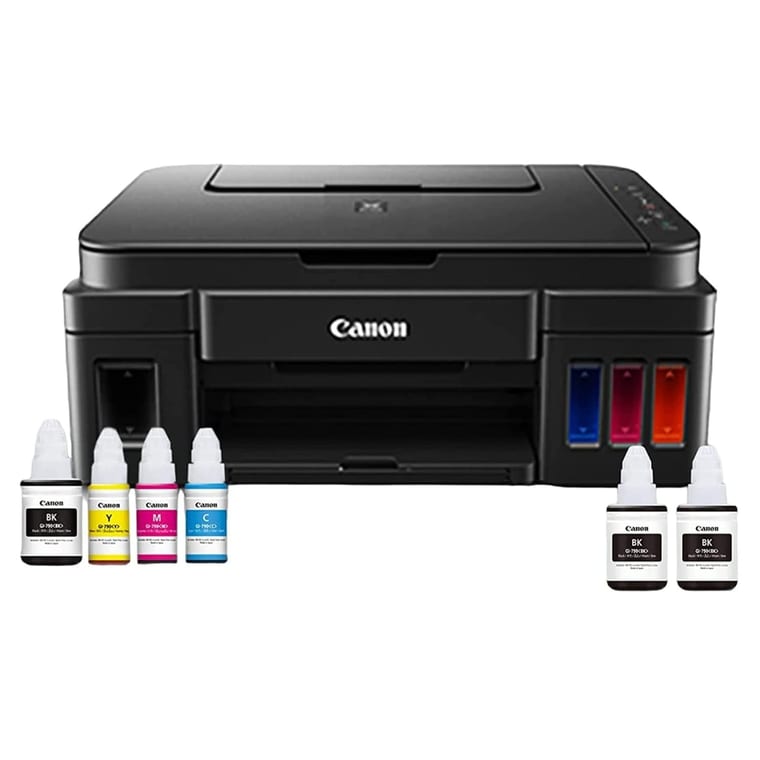
Canon PIXMA G3000
Lowest ink cost here, about ₹0.09 a black page, with two spare black bottles in the box.
~₹11,999Amazon.in
Check price →Around ₹11,999, rated 4.1 by 13,131 buyers, the most reviewed printer here.
This colour ink tank printer prints, scans and copies, and it connects by Wi-Fi or USB. Phones print through the Canon PRINT app. Canon rates it at 8.8 pages a minute in black and 5 in colour.
It has the lowest ink cost here. Canon rates each GI-790 black bottle at 6,000 pages and each colour bottle at 7,000. That works out to about ₹0.09 a black page and ₹0.34 a colour page. The box holds six bottles, including two spare black ones.
The warranty is 1 year or 15,000 prints, whichever comes first, with onsite service. The Amazon.in listing says Canon installs it free.
- Buy it if you print school projects in colour and forms in black, and want the lowest ink bill.
- Worth knowing: you flip pages by hand for two-sided printing, and it is 44.5 cm wide, so measure your desk.
Best ink tank printer for fewer refills: HP Smart Tank 589
HP Smart Tank 589
HP rates its bottles at 6,700 black and 10,100 colour pages, so you refill least.
~₹11,999Amazon.in
Check price →Around ₹11,999, rated 4.0 by 3,567 buyers. It was the top seller in Amazon.in's ink tank printer list when we checked.
This colour ink tank prints, scans and copies, and it connects by Wi-Fi or USB. Its listing says it works with Android phones and iPhones. Sensors warn you when ink runs low.
HP's bottles last the most pages here. For this printer, HP rates the 135 ml GT53XL black bottle at about 6,700 pages and each GT52 colour bottle at about 10,100 pages. That works out to ₹0.12 a black page and ₹0.33 a colour page.
The box includes a GT53XL black bottle and three colour bottles. The listing gives a 1-year warranty and a duty cycle of up to 3,000 pages a month.
- Buy it if you print a lot of colour and want to buy ink as rarely as possible.
- Worth knowing: HP measures these yields with its own method rather than the full ISO test, and two-sided printing is manual.
Best Wi-Fi printer without a router: Epson EcoTank L3250
Epson EcoTank L3250
Wi-Fi Direct for up to 8 devices without a router, and a 30,000-print warranty.
~₹14,419Amazon.in
Check price →Around ₹14,419, rated 4.0 by 3,697 buyers.
If your home has no Wi-Fi router and everyone uses mobile data, look at this Epson. Epson says its Wi-Fi Direct lets up to 8 devices connect without a router. Its Smart Panel phone app prints, copies, scans and sets up the printer. The printer also works on home Wi-Fi or USB.
This colour ink tank prints, scans and copies. Epson rates the 003 black bottle at 4,500 pages and each colour bottle at 7,500. That works out to about ₹0.10 a black page and ₹0.34 a colour page. Epson quotes about 10 pages a minute in black and 5 in colour.
The warranty covers 1 year or 30,000 prints, whichever comes first, and Epson says it includes the printhead.
- Buy it if several people print from phones and you have no router, or you print a lot and want the 30,000-print warranty.
- Worth knowing: the Amazon.in spec table lists automatic two-sided printing, but Epson's own page says it has none. It also costs about ₹2,400 more than the Canon and the HP.
Best laser printer for home use: Brother HL-L2321D
Brother HL-L2321D
Fast black-only laser with auto two-sided printing and a 2,600-page toner in the box.
~₹10,999Amazon.in
Check price →Around ₹10,999, rated 4.4 by 4,836 buyers, the highest rating here.
A laser printer suits homes that print black text: notes, forms and office papers. This Brother prints only, in black, through a USB cable. It prints on both sides of the paper by itself, and Brother lists up to 30 pages a minute. The tray holds 250 sheets.
The box includes a TN-2365 toner that Brother rates at 2,600 pages. A new one costs ₹3,572, about ₹1.37 a page. Toner does not dry out, so the printer is ready even if you print once a month. The warranty is 1 year.
- Buy it if you print black documents from a laptop or desktop and want fast, sharp pages.
- Worth knowing: it has no Wi-Fi or scanner. Brother's HL-L2440DW adds Wi-Fi for around ₹13,279 and is rated 4.4 by 767 buyers. Brother says the HL-L2440DW's in-box toner lasts about 3,000 pages in India.
Best laser all-in-one with scanner and copier: Brother DCP-L2520D
Brother DCP-L2520D
Laser print, scan and copy, with a button that copies both sides of an ID card.
~₹15,599Amazon.in
Check price →Around ₹15,599, rated 4.3 by 2,194 buyers.
Pick this laser if you also scan and photocopy, which many people in India call a "xerox". It prints, scans and copies in black, connects by USB, and prints on both sides by itself. Brother lists up to 30 pages a minute and a 250-sheet tray.
Its 2-in-1 ID copy button copies both sides of a card, such as an Aadhaar or PAN card, onto one page. It uses the same 2,600-page TN-2365 toner as the HL-L2321D, about ₹1.37 a page, and one comes in the box. The warranty is 1 year.
- Buy it if you copy documents and ID cards often and print mostly in black.
- Worth knowing: it has no Wi-Fi, so it needs a computer and a USB cable. The scanner is a flatbed, so you scan one page at a time.
Best budget colour printer: Canon PIXMA E470
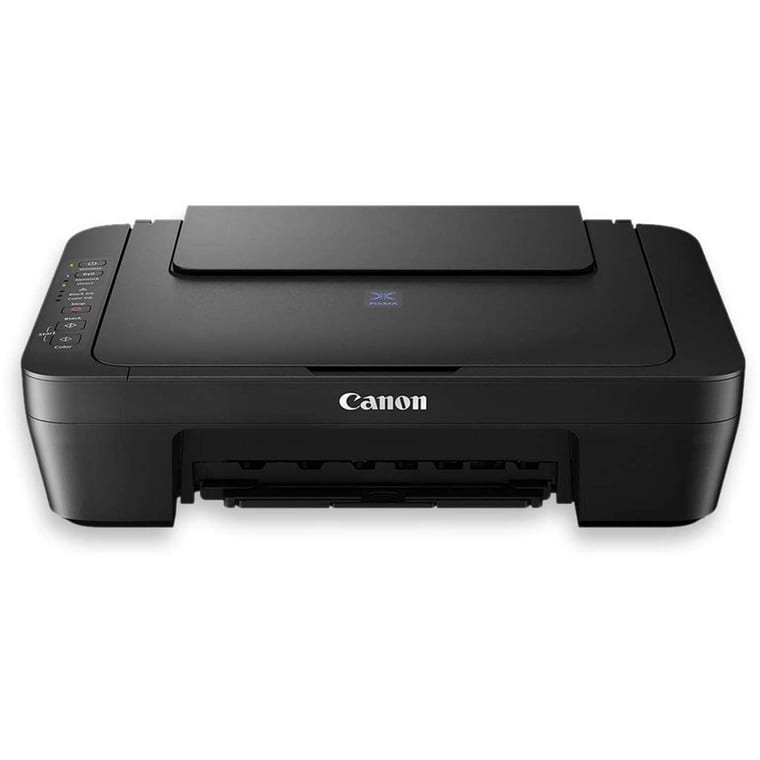
Canon PIXMA E470
Wi-Fi all-in-one for ₹5,199, but ₹1.82 a black page and ₹6.59 a colour page.
~₹5,199Amazon.in
Check price →Around ₹5,199, rated 3.8 by 1,919 buyers, the lowest rating here.
This cartridge inkjet prints, scans and copies, and it connects by Wi-Fi, USB or the Canon PRINT app. Canon also lists a direct mode for phones when there is no router. Canon rates it at 8 pages a minute in black and 4 in colour. Two-sided printing is manual.
Ink is where it costs more. Canon rates the ₹729 PG-47 black cartridge at 400 pages and the ₹859 CL-57S colour cartridge at 180 pages. That is ₹1.82 a black page and ₹6.59 a colour page, about 15 to 20 times the ink tank cost.
The warranty is 1 year with onsite service. The Amazon.in listing says this model does not get Canon's free installation.
- Buy it if you print fewer than about 50 pages a month, mostly in black, and want the lowest price to start.
- Skip it if you print colour projects often. Each colour page costs about 20 times as much as on the Canon G3000.
Do you need Wi-Fi, a scanner and two-sided printing?
Get Wi-Fi if anyone prints from a phone, a scanner if you fill in forms, and automatic two-sided printing if you print long notes. All three ink tanks and the Canon E470 have Wi-Fi and a scanner. Only the two Brother lasers print on both sides by themselves.
Online forms often ask for scanned documents, so an all-in-one is worth the extra cost. If you want an ink tank that prints both sides by itself, consider Brother's DCP-T535DW. It costs around ₹16,299, is rated 4.2 by 1,357 buyers and has two black bottles in the box.
For the rest of a student's desk, see our guides to the best laptops for students and the best tablet for students.
What about power cuts and printing only now and then?
Canon lists 10 to 14 watts for its inkjets here while printing or copying, and the Epson listing gives 12 watts, so a home inverter runs them easily. Brother's listings give about 510 to 537 watts for its two lasers. If you print rarely, a laser has an edge, because toner does not dry out.
Epson notes that its bottles may print fewer pages when you print rarely. If you print only a few pages a month on an ink tank, print one colour page every week or two to keep the ink flowing. Our inverter guide explains how much load a home inverter can carry.
Which printer brand is best for home use?
Canon, HP and Epson make the best ink tank printers for home use, and Brother makes the best-rated home laser printers. Canon, HP and Epson are close on running cost. On our picks the black page cost is within 3 paise, and the colour page cost within 1 paisa.
Canon offers onsite warranty service on the G3000 and E470. HP's bottles last the most pages, and Epson's warranty covers 30,000 prints and the printhead.
HP's Laser 1008w (around ₹12,429) has Wi-Fi but no automatic two-sided printing, and its listing says it works only with cartridges with original HP chips. Pantum sells lasers that cost less, but the models we found on Amazon.in had far fewer ratings than these Brothers.
What to check before you buy
- Type. An ink tank for colour and low running cost, a laser for black text, a cartridge inkjet only for light use.
- Functions. Print, scan and copy is worth having for forms, school work and ID card copies.
- Connectivity. Wi-Fi and a phone app if anyone prints from a phone, and Wi-Fi Direct if you have no router.
- Running cost. Divide the refill price by the maker's page yield. Under ₹0.15 a black page is low, and over ₹1.50 is high.
- Two-sided printing. Automatic two-sided printing saves paper on long notes. Manual means you turn the pages over yourself.
- Warranty. Check the page limit (15,000 prints on the Canon G3000, 30,000 on the Epson) and whether service is onsite.
- Total cost. Add two years of ink or toner to the printer's price before you compare models.
- Genuine ink. Buy refills sold as original by the brand. Canon's ink listings warn that fake ink can void the warranty.
A USB-only laser needs a computer. If you need one, see our best laptop under ₹40,000 picks.
Which printer should you buy?
For most homes, buy the Canon PIXMA G3000 at around ₹11,999. It prints, scans and copies, connects by Wi-Fi, costs about ₹0.09 a black page, and 13,131 buyers rate it 4.1.
If you print a lot of colour, the HP Smart Tank 589 needs the fewest refills. With no Wi-Fi router at home, the Epson EcoTank L3250 connects up to 8 devices directly.
For black text only, the Brother HL-L2321D laser at around ₹10,999 prints up to 30 pages a minute, and its toner does not dry out.